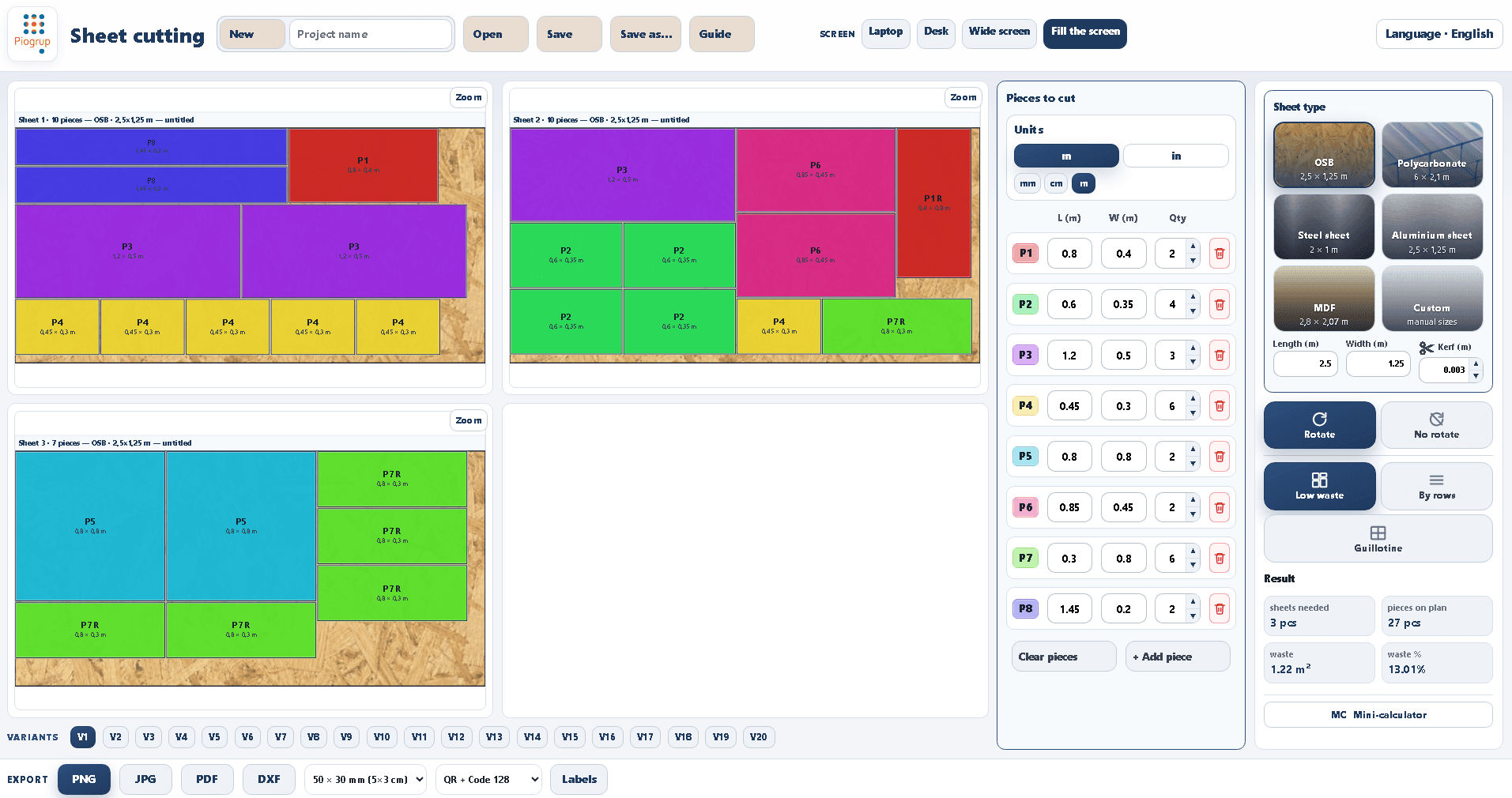
PIOCODEX Sheet Cutting v1.0.19 - 2D Nesting & Cutting Optimization Software
What You'll Get
1 file included
Total size: 3.84 MB
✓ Instant download after checkout
Description
🌟 PIOCODEX Sheet Cutting v 1.0.19
The ultimate lightweight 2D nesting and sheet cutting optimization software for Windows. Designed specifically to minimize material waste and instantly generate the most efficient cutting layouts right on your workshop floor.
Piocodex Sheet Cutting instantly calculates the ideal cutting pattern, saving you money, time, and effort on every single project!
⚙️ Key Features and Capabilities
📏 Hybrid Measurement System: Work in the unit you prefer. Switch instantly between metric (m, cm, mm) and imperial (in) units.
🧠 Smart Optimization: Enter your sheet size, desired parts, and blade/laser thickness (Kerf). The advanced algorithm instantly generates the layout with the absolute lowest material waste.
💻 Intuitive Side-by-Side Interface: Input your cutting pieces on the left, configure your stock material on the right, and watch the visual cutting diagrams update in real time.
🪵 Universal Material Support and Realistic Textures: Features built-in smart profiles for OSB, MDF, Steel sheet, Aluminium sheet, Polycarbonate, or completely custom sizes (Custom). The diagram dynamically renders the realistic visual texture of your selected material!
🔄 Grain Direction and Rotation Control: Toggle piece rotation (Rotate / No rotate) on or off with one click—crucial for preserving grain direction on wood projects. Rotated pieces are clearly marked with an R indicator (e.g., P1 R, P3 R) directly on the diagram.
📐 3 Advanced Cutting Strategies: Switch instantly between three powerful optimization modes: Low Waste (maximum material yield), By Rows (organized line-by-line), or Guillotine (straight, edge-to-edge cuts).
🔀 20 Distinct Layout Options: The software generates 20 completely different optimization variations (V1 to V20) instantly. Flip through them via the bottom bar to pick the one that best suits your cutting setup.
🏷️ Smart Labels and QR Codes: Includes a built-in Mini-calculator (MC) and a robust label generation system. The layout uses optimized, highly compressed payloads for QR Codes and Code 128, ensuring clean, flawless scanning on your printed sheets.
🖨️ Universal Label Printing: Print your parts labels directly from the app to any standard thermal printer (Zebra, Dymo, Brother, etc.) using the native Windows print dialog—no complex SDK setups required.
💾 Instant Digital Export: Save your color-coded visual cutting diagrams directly as high-resolution PNG, JPG, PDF, or DXF files (perfect for quick printing or sending to CNC machinery).
🚀 Why Choose Piocodex?
🪶 Ultra-Lightweight: Powered by a modern, high-performance tech stack (Tauri v2). The installer is only a few megabytes and runs instantly without bloating your system.
🔌 100% Offline and Private: Install it once and use it anywhere—even deep in the workshop with zero internet connection. No forced cloud accounts, no data tracking, and no internet required.
🌐 Global Ready: Features a multilingual interface with 24 selectable languages available in a single click from the top-right corner.
🔑 Simple Licensing (No Subscription)
⚡ Instant Activation: Your unique license key is generated automatically by the platform. You will receive your activation key instantly on your purchase receipt and via email to unlock the full version.
💰 One-Time Purchase: Pay once, keep the software forever. No monthly subscriptions, no yearly fees, and all minor version updates are included free.
💻 System Requirements and Compatibility
✅ Windows 10 / 11 (64-bit / x64) — Fully supported and recommended (the standard for almost all modern workshop and office PCs).
⚠️ Technical Note: The app relies on the WebView2 Runtime (Edge framework). On updated Windows 10/11 machines, this is already built-in. On a completely fresh or blank Windows installation, your system may prompt a quick, automatic routine download on the very first run.
❌ Not Supported: 32-bit Windows (x86), ARM64 devices (like Surface ARM without a separate build), or legacy Windows 7 / 8 platforms.
🛠️ Quick Installation Guide (Windows SmartScreen)
Because PIOCODEX Sheet Cutting is an independent utility, Windows SmartScreen may display a temporary blue warning saying Unknown Publisher when you first launch the installer. This is a standard security protocol for newly compiled files that haven't accumulated global downloads yet.
How to run it in 2 simple steps:
Click on More info inside the blue Windows alert window.
Select Run anyway.
The software is 100% clean, secure, and completely virus-free